SIM Swap Warning Signs: 8 Signs to Check
 By Inflix
 SIM swap warning signs can appear suddenly and may leave you unable to make calls, receive texts or access important online accounts.
A SIM swap attack happens when a criminal convinces a mobile network to move your phone number to another SIM card or eSIM. Once the transfer succeeds, the criminal may receive calls and text messages intended for you.
As a result, they may try to intercept security codes, reset passwords or access accounts linked to your phone number. The UK National Cyber Security Centre explains that attackers can use social engineering to persuade mobile providers to transfer a customer’s number to another SIM.
However, a lost signal does not always mean that someone has stolen your number. Network faults, damaged SIM cards, unpaid bills and temporary outages can cause similar symptoms.
Therefore, this guide explains the main SIM swap warning signs, how to check whether an unauthorised transfer occurred and what to do immediately.
What Causes SIM Swap Warning Signs?
A SIM swap attack does not usually involve physically stealing the SIM card from your phone.
Instead, the criminal contacts your mobile provider and pretends to be you. They may claim that the phone was lost, the SIM stopped working or they need to activate a new device.
To make the request appear genuine, the attacker may use personal details collected from phishing messages, leaked databases, social media or earlier scams.
If the network approves the request, your number moves to a SIM or eSIM controlled by the criminal. Your original phone may then lose mobile service.
The attacker may receive:
- SMS verification codes
- Password reset messages
- Bank security alerts
- Incoming calls
- Account recovery messages
The number alone does not give the attacker automatic access to every account. Nevertheless, it can become a powerful tool when a service relies on SMS for account recovery or two-factor authentication.
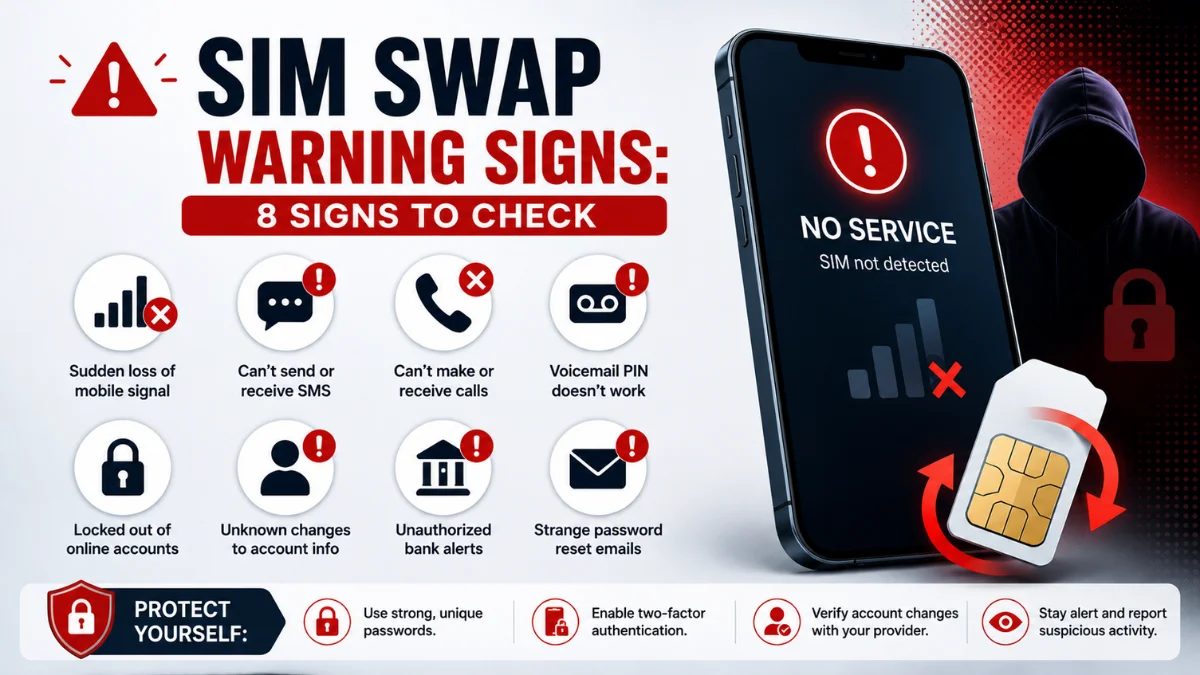
8 SIM Swap Warning Signs You Should Check
1. Your Phone Suddenly Loses Mobile Service
One of the strongest SIM swap warning signs is an unexpected loss of mobile service.
Your phone may display:
- No Service
- Emergency Calls Only
- SOS
- SIM Not Provisioned
- Invalid SIM
- No mobile network
First, restart the phone and move to an area where you normally receive a strong signal.
Next, check whether other people using the same mobile network also have problems. A local outage may affect several users at once.
However, contact your provider immediately when your phone remains disconnected and no wider network problem exists.
Do not rely only on calling from the affected phone. Use another trusted device, the provider’s official app, online chat or a verified customer-service number.
2. You Cannot Make Calls or Send Texts
A phone affected by an unauthorised SIM transfer may lose the ability to make normal calls or send SMS messages.
Wi-Fi may continue working, so apps such as WhatsApp, email and social media could still appear normal. However, mobile calls and texts may fail.
Try calling your number from another phone. A SIM swap may have occurred if the other device rings, receives the call or sends it directly to an unfamiliar voicemail service while your phone remains disconnected.
Nevertheless, do not repeatedly test the number for too long. Contact your network quickly because early action may limit further damage.
3. Security Codes Stop Arriving
Missing verification messages can be another warning.
For example, you may request a code from your bank, email service or social media account, but the text never reaches your phone.
One delayed code does not prove that a SIM swap occurred. Mobile networks can experience temporary delivery problems.
However, investigate immediately when several services stop sending codes at the same time, particularly when your phone has also lost mobile service.
The NCSC notes that criminals who gain control of a phone number may receive SMS messages and calls sent to the genuine customer.

4. You Receive an Unexpected SIM Activation Message
Your mobile provider may send an email, notification or text confirming:
- A new SIM activation
- An eSIM installation
- A device change
- A number transfer
- A replacement SIM request
- A porting request
Treat any unexpected confirmation as urgent.
Do not click a link inside a suspicious message. Instead, open the provider’s official app or type its website address yourself.
You should also call the mobile network using a verified number from its website, your bill or another trusted source.
Quick SIM Swap Warning Signs Table
| Warning sign | Possible innocent cause | When to act |
|---|---|---|
| Sudden loss of signal | Network outage | Your provider confirms no outage |
| Calls and texts stop | Damaged SIM | Wi-Fi works but mobile service does not |
| Security codes disappear | SMS delay | Several services stop sending codes |
| New SIM notification | Legitimate upgrade | You did not request any change |
| Account login alerts | Your own new device | Device or location is unfamiliar |
| Password reset emails | Forgotten request | You did not start the reset |
| Bank activity | Pending purchase | Payment or login is unknown |
| Provider account locked | Password error | Details changed without permission |
5. Your Accounts Show Unknown Login Attempts
A criminal may use control of your number to request password resets or verification codes.
Therefore, check your email, bank, Google Account, Apple Account and social media security pages for unfamiliar activity.
Look for:
- New device logins
- Password reset requests
- Changed recovery details
- Unknown trusted devices
- Security settings you did not change
- New payment methods
- Account recovery attempts
Google advises users to respond quickly to security alerts involving new-device sign-ins or important account changes. Review Google’s guidance for responding to security alerts.
Similarly, Apple recommends reviewing account information and removing devices you do not recognise when you suspect unauthorised access. Follow Apple’s compromised-account guidance.
6. Password Reset Emails Arrive Without Your Request
You may suddenly receive password reset emails from your bank, email provider, shopping accounts or social media services.
A scammer may be testing which accounts use your phone number.
Do not approve any unexpected request. Additionally, avoid clicking links inside the email until you confirm that the message is genuine.
Open the official app or website directly and review recent account activity.
Your email account requires particular attention because attackers may use it to reset passwords for several other services.
7. Your Bank Reports Suspicious Activity
A SIM swap can become especially dangerous when criminals already know some of your banking or personal details.
You may notice:
- An unexpected bank login
- A new payment recipient
- An attempted card payment
- A money transfer
- A change to account contact details
- A security code you did not request
Contact your bank immediately through its official app or the number printed on your card.
Do not wait for money to leave the account. Ask the bank to review recent access and place additional protection on the account where possible.
The NCSC advises people who have lost money or shared sensitive financial information to contact their bank straight away. Read the NCSC’s official phishing response guidance.
8. You Cannot Access Your Mobile Network Account
An attacker may change the password, email address, PIN or security questions connected to your mobile account.
Consequently, you may find that the provider’s app rejects your usual login details.
You might also receive notifications confirming changes that you did not make.
Contact the network immediately and explain that you suspect an unauthorised SIM replacement, eSIM activation or number transfer.
Ask the provider to:
- Disable the unauthorised SIM or eSIM.
- Restore the number to your legitimate SIM.
- Review recent account changes.
- Add a stronger account PIN.
- Block further number transfers.
- Confirm whether a PAC or replacement SIM was requested.
In the UK, moving a number between providers is known as porting. Ofcom explains that customers normally request a Porting Authorisation Code when switching networks and keeping their number. Read Ofcom’s mobile switching guidance.
What to Do After Seeing SIM Swap Warning Signs
Act quickly when several signs appear together.
Start by contacting your mobile provider through a different phone or secure internet connection. Tell the support representative that you suspect SIM swap fraud rather than a simple signal problem.
Ask them to check whether anyone recently:
- Activated a replacement SIM
- Installed an eSIM
- Requested a PAC
- Ported your number
- Changed your account details
- Added a new device
- Reset your account PIN
After securing the number, protect your online accounts.
Change the password for your main email account first. Next, update your banking, Apple, Google and social media passwords.
Use a different trusted device when possible, particularly when you also suspect spyware or remote access on your phone.
SIM Swap Warning Signs on Android
The SIM swap itself normally happens at the mobile-network level, so Android settings cannot directly prove who transferred the number.
Nevertheless, your phone can help reveal related account activity.
Check your Google Account:
Settings > Google > Manage your Google Account > Security
Review:
- Your devices
- Recent security activity
- Recovery phone number
- Recovery email
- Two-step verification methods
- Third-party account access
Sign out unfamiliar devices and remove recovery details you do not recognise.
Google provides dedicated steps for recovering and securing an account when someone else may have accessed it. Follow Google’s compromised-account recovery guidance.
You should also run Google Play Protect if the incident started after installing an unknown app or clicking a suspicious link.
Our guide on app safety checks before installing explains how to identify risky applications and permissions.

SIM Swap Warning Signs on iPhone
An iPhone may display SOS, No Service or another connection warning after the original SIM loses access to the mobile network.
First, check whether an outage affects your area. Afterwards, contact your provider if mobile service does not return.
Review your Apple Account by opening:
Settings > Your name
Scroll down and check every connected device. Remove anything you do not recognise.
You should also review trusted phone numbers, account recovery information and recent security notifications.
Apple warns users never to share passwords, verification codes, recovery keys or other account-security details. Read Apple’s official account-security guidance.
If your Apple Account may have been compromised, change the password and follow Apple’s recovery steps immediately.
Can SIM Swap Warning Signs Appear While You Have Signal?
Usually, your original SIM loses mobile access after the number moves to another SIM.
However, the timing may vary. A transfer could remain pending, or an attacker may only have started the account-recovery process.
Additionally, some attacks focus on gaining access to a mobile-network account without immediately moving the number.
Therefore, do not ignore unexpected SIM replacement messages merely because your phone still works.
Contact the network and ask whether anyone requested a change.
Can SIM Swap Warning Signs Start With Your Phone Number?
A phone number alone may not provide enough information to complete a SIM swap.
However, criminals often combine it with other personal details, such as:
- Full name
- Date of birth
- Address
- Account number
- Email address
- Answers to security questions
- Information from social media
- Details collected through phishing
The attacker may then impersonate the customer during a call, online chat or store visit.
This is why you should avoid publishing your phone number, birth date and other recovery details publicly.
You should also learn to recognise phone call scam signs because criminals may call before or after a SIM swap to collect additional information.
Can SIM Swap Warning Signs Affect Two-Factor Authentication?
A SIM swap may allow an attacker to receive codes delivered by SMS.
However, it does not automatically bypass every form of two-factor authentication.
Authentication apps, passkeys and physical security keys do not depend on receiving a normal text message. Therefore, they can provide stronger protection against attacks focused on stealing a mobile number.
Use an authenticator app, passkey or security key whenever an important service supports one.
Keep backup codes in a secure offline place. Do not save the only copy on the same phone that receives your login codes.
How to Prevent SIM Swap Fraud
Begin by securing your mobile account.
Ask your network whether it offers:
- An account PIN
- A number-transfer lock
- A porting lock
- Extra identity checks
- In-store verification
- Alerts for SIM or eSIM changes
The exact options vary between providers, so contact your network directly.
Next, replace SMS verification with an authentication app, passkey or physical security key where possible.
You should also:
- Use a unique password for your mobile account.
- Protect your main email account with strong authentication.
- Remove personal details from public social profiles.
- Avoid sharing one-time security codes.
- Treat unexpected support calls with suspicion.
- Review mobile-account notifications immediately.
- Secure your voicemail with a strong PIN.
- Store account recovery codes safely.
Never give a caller a verification code, even when they claim to represent your bank, mobile network, Apple, Google or another trusted company.
What If the SIM Swap Started With a Scam Message?
Criminals may send a fake mobile-network message asking you to confirm account information, upgrade your SIM or prevent service suspension.
The link may open a copied login page designed to steal your mobile-account password.
If you entered information after opening a suspicious page, follow our guide on what to do after clicking a scam link.
Change the affected password and contact your mobile network through an official channel.
The NCSC allows UK users to forward suspicious texts to 7726 and report scam websites. View the NCSC’s phishing reporting options.
How to Report SIM Swap Fraud in the UK
First, contact your mobile provider and bank immediately.
Ask both organisations to record the incident as suspected fraud and secure the affected accounts.
If criminals stole money or accessed financial accounts, report the incident through Report Fraud in England, Wales and Northern Ireland.
In Scotland, contact Police Scotland.
Keep evidence such as:
- Provider emails
- SIM activation messages
- Security alerts
- Bank notifications
- Dates and times
- Support reference numbers
- Screenshots of account changes
Do not delete important messages until the mobile network, bank or authorities confirm that they no longer need them.
Final Thoughts on SIM Swap Warning Signs
SIM swap warning signs require quick attention, especially when sudden signal loss appears alongside account alerts or missing security codes.
First, check for a normal network outage. However, contact your mobile provider immediately when other users still have service or you receive an unexpected SIM activation message.
After restoring your number, secure your main email, banking, Google, Apple and social media accounts. Remove unfamiliar devices and change compromised passwords.
Most importantly, reduce future risk by adding a strong mobile-account PIN and replacing SMS verification with an authentication app, passkey or security key whenever possible.
Frequently Asked Questions
What are the main SIM swap warning signs?
The main SIM swap warning signs include sudden signal loss, failed calls, missing security codes, unexpected SIM activation messages and unknown account login attempts.
Does No Service always mean a SIM swap?
No. A network outage, damaged SIM, unpaid bill or phone fault may cause the same message. Contact your provider when the problem continues without a known outage.
Can a SIM swap access my bank account?
A SIM swap alone does not provide automatic access. However, criminals may use your number to receive security codes or reset account passwords when they already have other details.
How quickly should I report a SIM swap?
Report it immediately. Contact your mobile provider first, then your bank and any affected online services.
Can I stop a SIM swap with a PIN?
A strong mobile-account PIN may make impersonation more difficult. Additionally, ask your provider about porting or number-transfer locks.
Is an eSIM vulnerable to SIM swapping?
Yes. A criminal may attempt to persuade a provider to activate an eSIM linked to your number. The attack targets the account-transfer process rather than the physical card.
Should I stop using SMS two-factor authentication?
SMS protection is better than using only a password. Nevertheless, authenticator apps, passkeys and security keys generally provide stronger protection against SIM swap attacks.
Can I get my number back after a SIM swap?
In many cases, the mobile provider can disable the unauthorised SIM and restore the number after verifying your identity. Contact the provider as soon as possible.